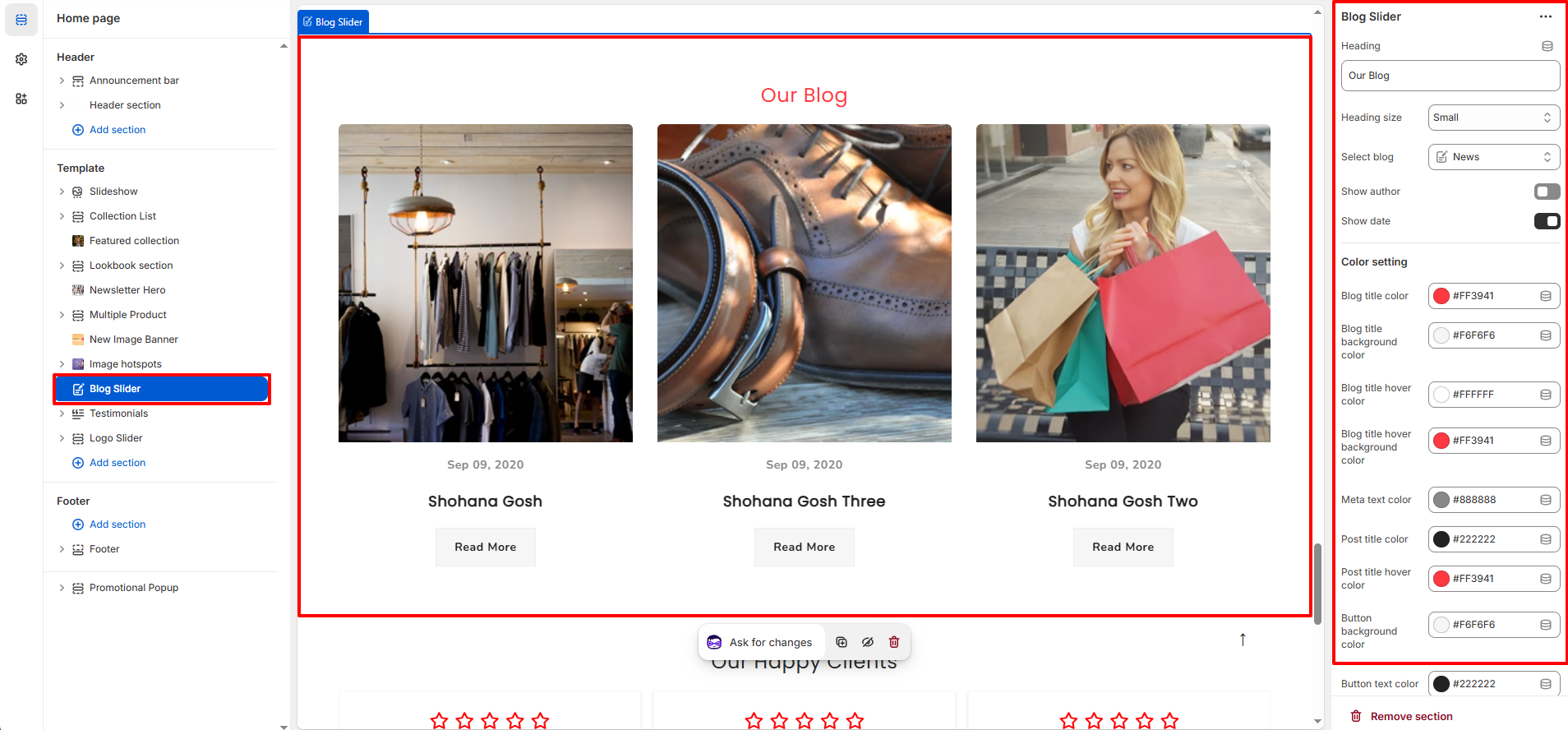
Blog Slider
The Blog Slider section allows you to showcase recent blog posts in a clean and structured layout. It helps improve engagement by highlighting articles, updates, and news directly on the homepage.
1. Blog Slider Section Settings
All settings below apply to the entire Blog Slider section.
- Heading: Set the main section title (e.g., Our Blog).
- Heading Size: Choose the size of the section heading (Small, Medium, Large).
- Select Blog: Choose which blog category posts should be displayed from.
- Show Author: Enable or disable author name display.
- Show Date: Enable or disable publish date display.
Color Settings
- Blog Title Color: Set blog category/title color.
- Blog Title Background Color: Background color for blog label.
- Blog Title Hover Color: Text color on hover.
- Blog Title Hover Background: Background color on hover.
- Meta Text Color: Author and date text color.
- Post Title Color: Blog post title color.
- Post Title Hover Color: Title color when hovered.
Button Styling
- Button Background Color: Default button background color.
- Button Text Color: Default button text color.
- Button Hover Background Color: Background color on hover.
- Button Hover Text Color: Text color on hover.
Note: Ensure your selected blog contains published posts with featured images for the best visual layout.